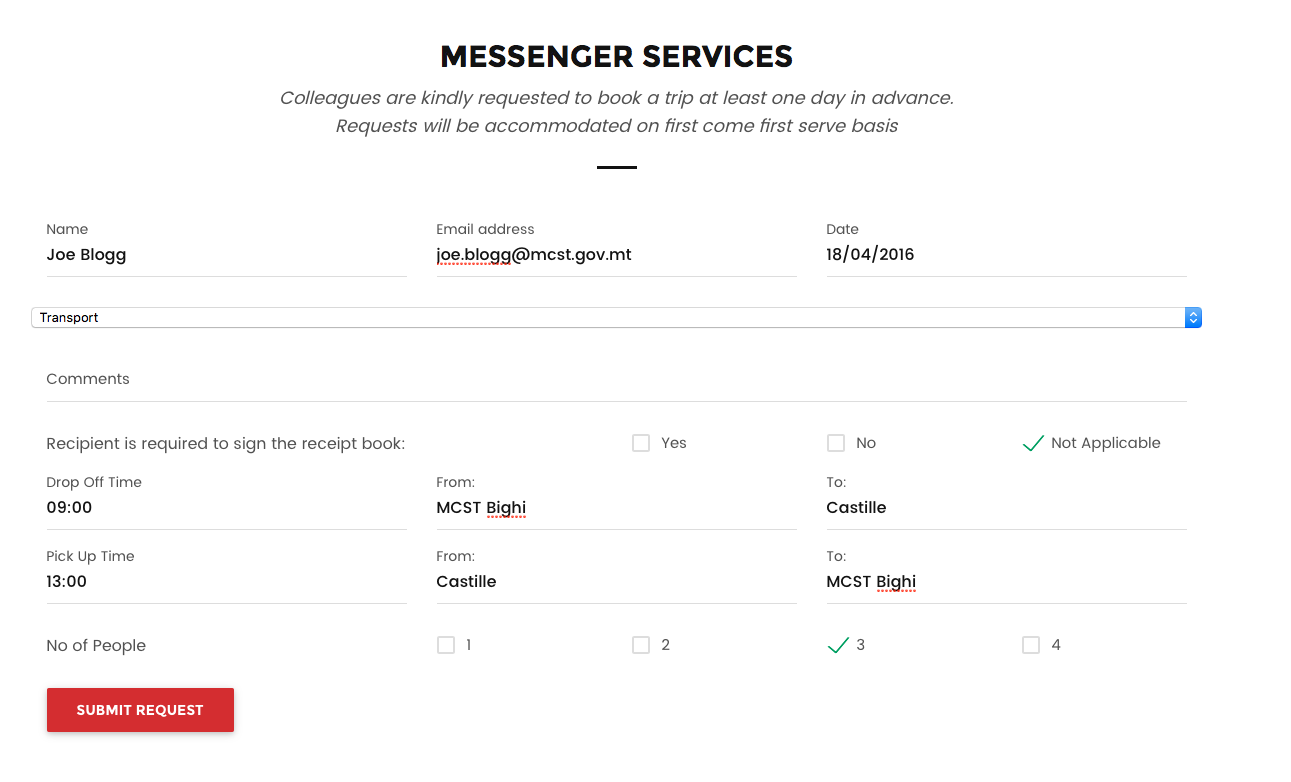
When entering the Messenger Service page you will see the below shown form that incorporates all the elements required to be able to request Messenger Services.
Fields:
Name: Enter your name and Surname
Email: Enter your email address (Required)
Date: Enter the date you require the service. Date is to be enter as DD/MM/YYYY
Services Required: This is a drop down menu. You are required to click on it and select one of the following options

Comments: Enter any free text comment you require to help the support agent better understand your requirements
Recipient is required to sign the receipt book: Select YES, NO or NOT APPLICABLE
Drop Off Time: This field is required when Transport is selected in the Services Required Field. Here you are required to enter the time that the vehicle is required to collect the individual for Transport
From: Location from which the person will be picked up
To: Drop Off Location
Pick Up Time: This field is required when Transport is selected in the Services Required Field. Here you are required to enter the time that the vehicle is required to collect the individual for Transport
From: Location from which the person will be picked up
To: Drop Off Location
No of People: The number of people that will be transported. This cannot exceed 4 persons.
Once all the details are entered as per example below click on the SUBMIT REQUEST button in Red.
0 Comments